DATA PIPELINE 360
Automated Analytics Pipeline
DATA PIPELINE 360 is an end-to-end project that shows how raw source files can be transformed into a structured, reliable and actionable Power BI reporting solution.
The project covers the full chain: file intake, data quality checks, Python processing, SQLite storage, SQL analytical views, Power BI modeling and KPI visualization.

Project objective
Build a complete, automated and maintainable analytics pipeline.
Context
Companies often receive multiple business files in different formats. Without a clear pipeline, checks remain manual, errors multiply and reporting becomes unreliable.
Delivered solution
This project implements a pipeline that centralizes the sources, validates data quality, creates SQL analytical views and feeds a multi-page Power BI report for business monitoring.
Pipeline architecture
A simplified view of the technical blocks, from source file intake to final reporting.
Flow drawing: Sources → Python → Data Quality → SQLite / SQL Views → Power BI Model → Final Dashboard.
Detailed process steps
The project follows a simple and robust sequential workflow.
1. Source files received
- Sales CSV for transactions.
- Master Data Excel for product, customer and store dimensions.
- Targets CSV for commercial targets.
2. Python scripts
- File ingestion.
- Structure and type validation.
- Duplicate detection.
- Error handling and logging.
3. SQLite storage
- Fact and dimension tables.
- File processing history.
- Lightweight, maintainable and portable database.
4. SQL layer
- vw_sales_daily
- vw_sales_monthly
- vw_product_performance
- vw_customer_performance
- vw_sales_vs_target
- vw_data_quality
- vw_sales_analysis
5. Power BI model
- Relationships between tables.
- Centralized DAX measures.
- Consistent filtering across visuals.
- KPI formatting and navigation setup.
6. Final delivery
- Sales dashboards.
- Target tracking.
- Pipeline monitoring.
- Technical and KPI documentation.
Technical challenges
Three concrete problems addressed while building the pipeline.
1. Making incoming files reliable
Problem: incoming files may contain missing columns, duplicates, invalid dates, negative quantities or unknown reference IDs.
Solution: Python validation checks are applied before loading, covering structure, null values, duplicates, data types, amount consistency and reference keys.
Result: non-compliant files are rejected before database loading and detected anomalies are recorded.
2. Preventing duplicate loads
Problem: the same file must not be loaded multiple times across successive pipeline runs.
Solution: the File_History table and SUCCESS / FAILED / ERROR statuses are used to track each processing attempt.
Result: successfully processed files can be identified and the loading process becomes traceable.
3. Preparing data for analytics
Problem: raw transactional data is not directly suited to recurring reporting and analysis.
Solution: a SQLite model with fact and dimension tables was created, followed by SQL views for sales, customers, products, targets and Data Quality.
Result: Power BI consumes a structured and reusable analytical layer.
Data insights
Selected findings produced from the project's demonstration dataset.
Customer performance
Nadia El Amrani is the top customer in the dataset with 2,073.70 in sales, followed by Nord Distribution (899.00) and Atlas Services (769.30).
Product performance
Laptop 15 Inch generates the highest sales value at 1,199.00, followed by Wireless Headphones (1,029.70) and Smartphone (899.00).
Store performance
Rabat Agdal ranks first with 2,073.70 in sales, ahead of Casablanca Center (1,238.80) and Atlas Online (1,018.60).
Technology stack
Technologies used throughout the project.
Report pages
Each page covers a specific business monitoring angle.
HOME
Landing page of the project with the visual identity and navigation to the analytical pages.
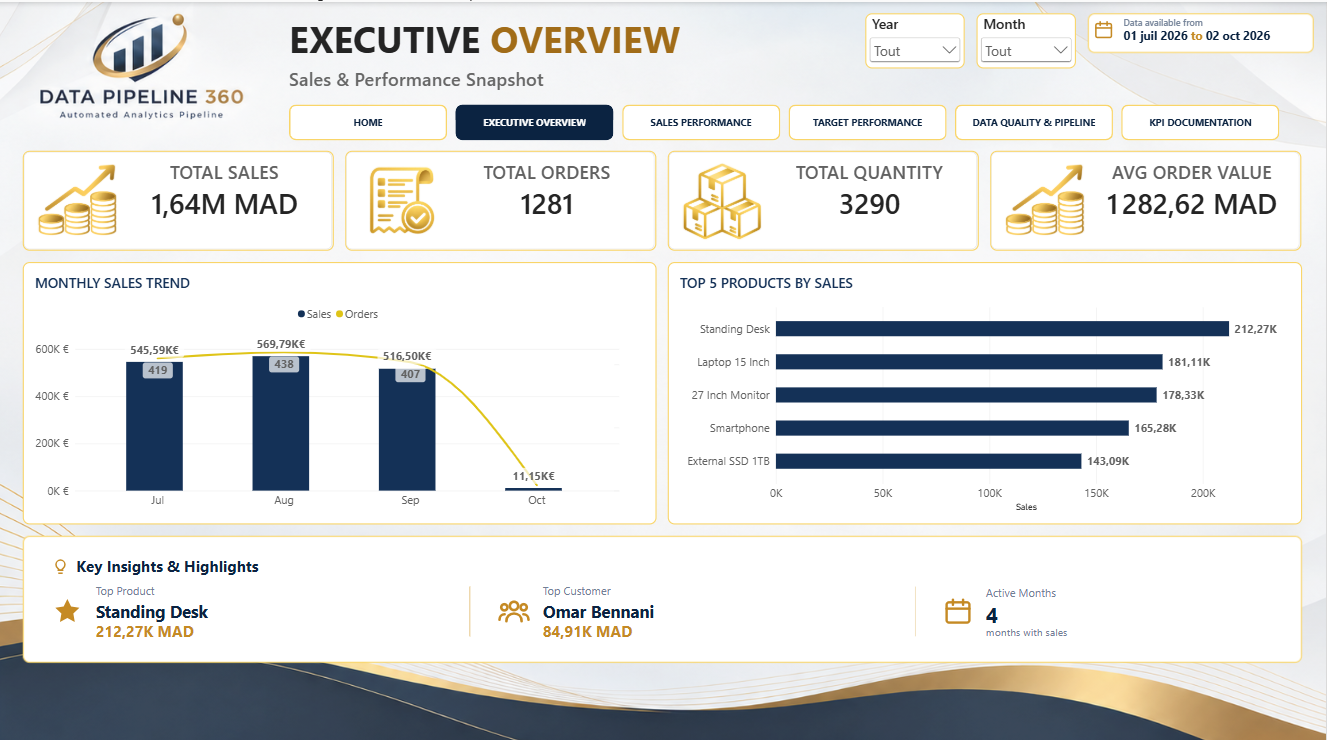
EXECUTIVE OVERVIEW
High-level summary of the main sales KPIs, monthly trends, top products and key highlights.
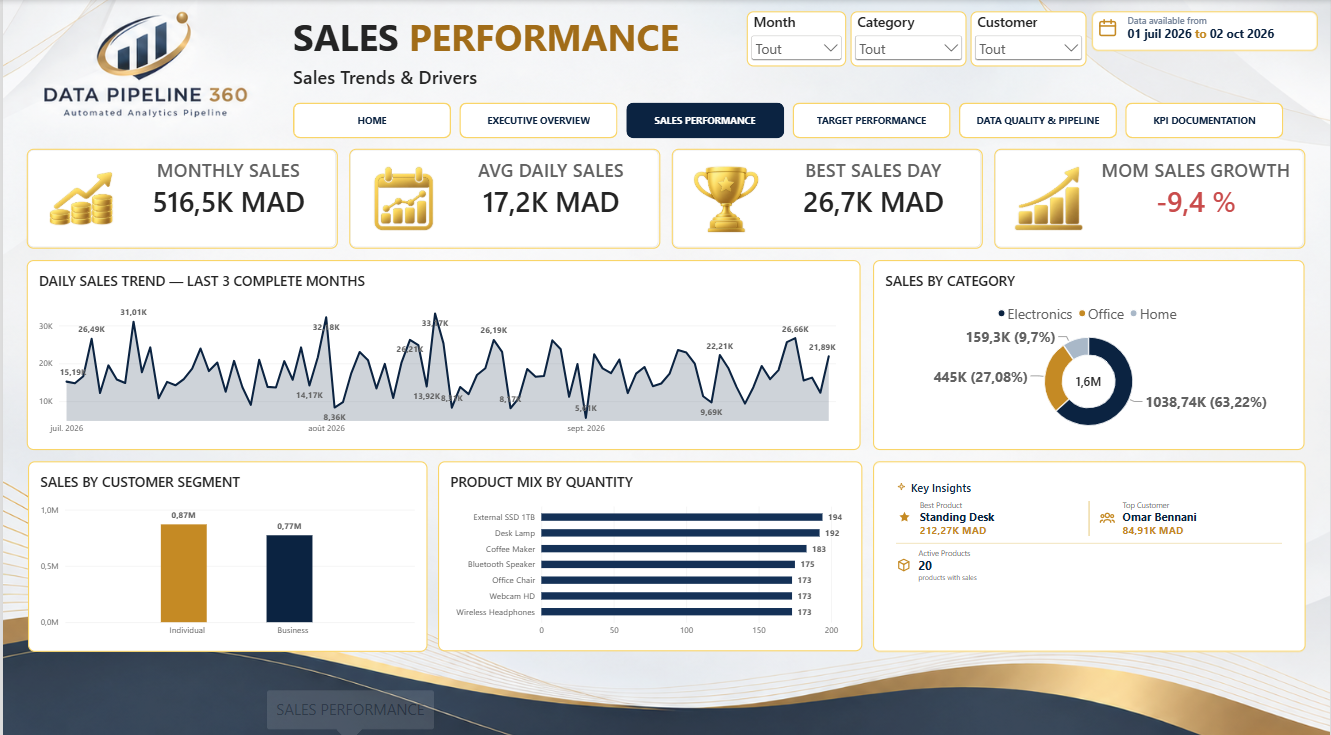
SALES PERFORMANCE
Detailed analysis of sales performance by period, category, customer segment and product mix.
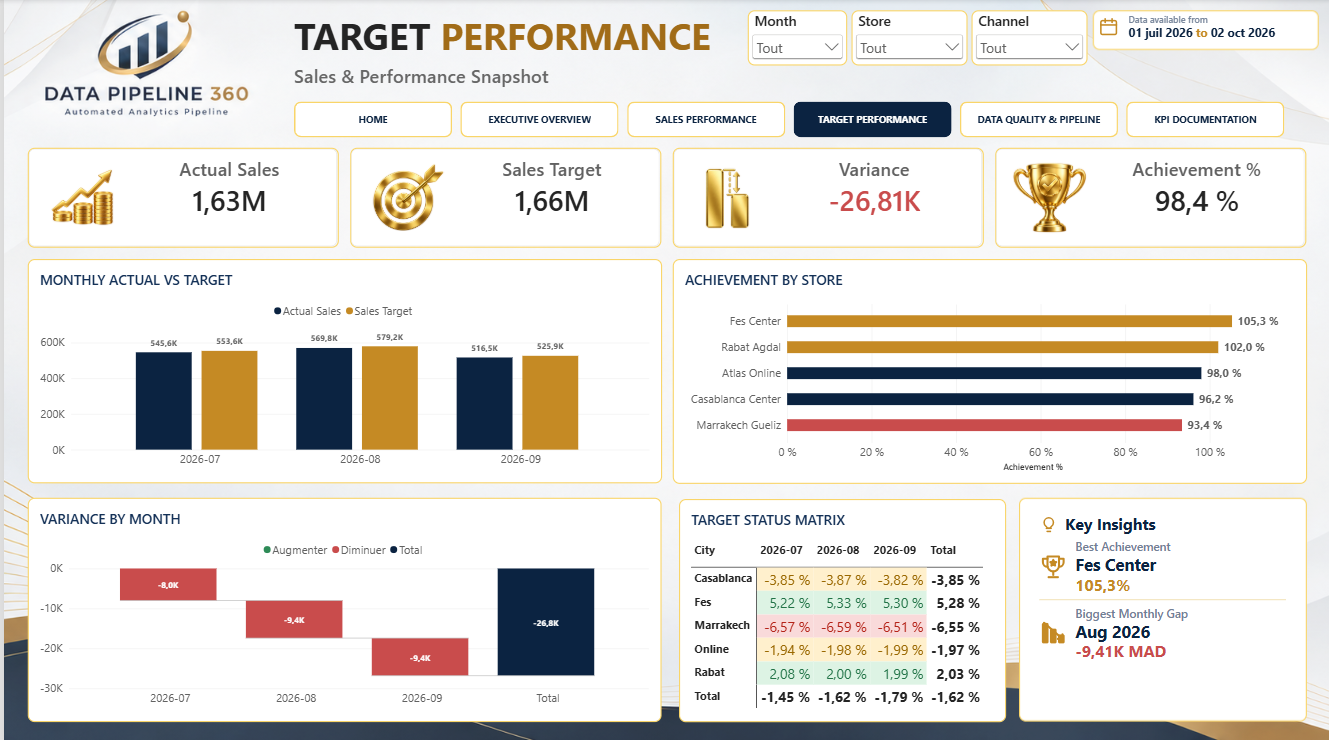
TARGET PERFORMANCE
Comparison between actuals and targets with focus on achievement, variances and store performance.
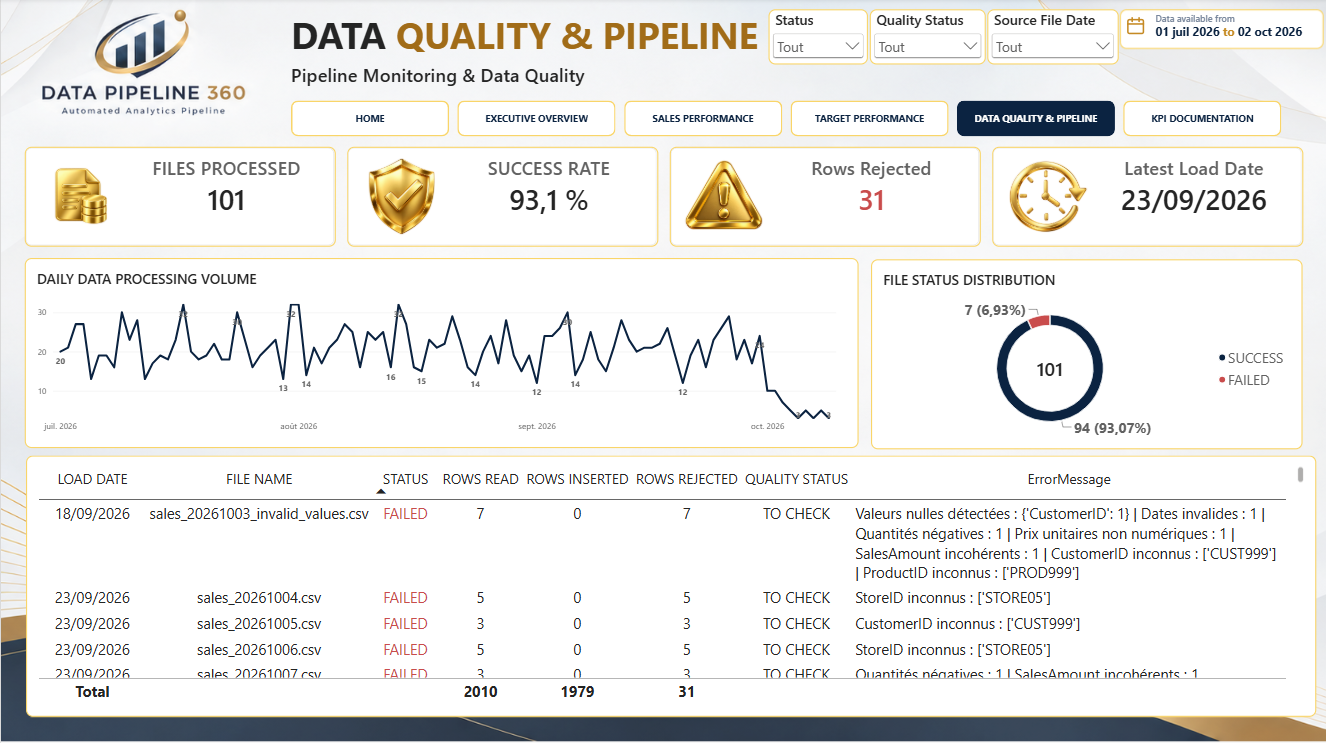
DATA QUALITY & PIPELINE
Technical monitoring page for file processing, success rate, rejected rows, load activity and data issues.
Business value
What this project demonstrates from both a technical and business perspective.
Technical value
- Automated processing flow.
- Built-in data quality checks.
- Clear separation between ingestion, storage, transformation and reporting.
- Maintainable and scalable approach.
Business value
- Clear view of commercial performance.
- Reliable target and variance monitoring.
- Data quality oversight.
- Better decision-making support.